PES 2017 Patch 2026
The PES 2017 Patch 2026 gives new life to the classic Pro Evolution Soccer 2017, turning it into a modern powerhouse for soccer fans. This popular update includes the most recent player transfers, squad rosters, and team ratings that are in line with the current seasons, making sure that every match feels new and real. This patch improves the core experience of tactical gameplay, stunning graphics, and immersive simulations that have made the series a staple in sports gaming, whether you’re a dedicated PC gamer or trying out mobile options through emulators like Winlator.
Immersive Modes and Career Progression
PES 2017 is mostly about realistic football action and not a linear story. However, the Master League mode has a great progression system that makes you feel like you’re making your own epic story. As a manager, players look for new talent, negotiate contracts, and lead their club through tough rivalries, domestic leagues, and international cups. The 2026 patch adds new player attributes, realistic aging mechanics, and dynamic transfer markets that change with the times, making it possible to make more strategic decisions that change over the course of several seasons.
The “Become a Legend” mode lets you make and grow a single player from a small start to global fame. Navigating career milestones, injuries, and changes in form makes for an interesting journey, and the patch adds current stars and formations to make it even better. This mix of managing and personal growth makes sessions addictive and encourages you to invest in your virtual football legacy for a long time.
Dynamic Gameplay Mechanics
PES 2017 Patch 2026 is at its best when it comes to its refined gameplay, which focuses on precise ball control, adaptive AI, and smooth animations that capture the essence of professional soccer. Passing, dribbling, and shooting all feel natural but hard. The patch makes transitions smoother and updates the physics to make player movements more realistic. Defensive plays need precise timing for tackles and interceptions, while offensive plays reward creativity in building attacks, so every goal is a sign of skill, not luck.
The patch’s balance changes make sure that all teams play fairly, and the multiplayer options, like online matches and local co-op, add more layers of competition. Better reactions from goalkeepers and better execution of set pieces make the experience even better, allowing for dramatic comebacks and tactical masterclasses. The core loop is fun for both casual fans and hardcore tacticians, whether you’re pretending to be in a high-stakes derby or trying out different formations.
Thrilling On-Field Experiences
PES 2017 Patch 2026 is an adrenaline rush that gets your heart racing. The roar of virtual crowds and precise commentary make the game even more immersive during intense matches. The joy of making a perfect through-ball or stopping a corner kick at the last minute creates memorable moments that last long after the final whistle. These moments combine nostalgia with modern updates to make the game fun to play over and over on different platforms.
Essential System Specifications for Optimal Play
| Platform | Minimum Requirements | Recommended Requirements |
|---|---|---|
| PC CPU | Intel Core2 Duo 1.8GHz or AMD Athlon II X2 240 | Intel Core i3 530 or AMD Phenom II X4 925 |
| PC GPU | NVIDIA GeForce 8800 or AMD Radeon X1600 or Intel HD Graphics 3000 (1GB VRAM) | NVIDIA GeForce GTX 260 or AMD Radeon HD 4850 or Intel HD Graphics 4000 (1GB VRAM) |
| PC RAM | 1 GB | 2 GB |
| Android/Winlator CPU | Snapdragon 720G or MediaTek Dimensity 800 | Snapdragon 8 Gen 2 or MediaTek Dimensity 9000 |
| Android/Winlator GPU | Adreno 618 or Mali-G77 | Adreno 730 or Mali-G710 |
| Android/Winlator RAM | 4 GB | 8 GB or more |
Players with minimum PC setups can expect stable performance around 30–40 FPS at lower resolutions, which means smooth gameplay for regular matches without sacrificing graphics. Recommended PC hardware unlocks smooth 60 FPS at 1080p, which improves visual details like player models and stadium atmospheres. For Android users through Winlator, mid-range devices get 30–45 FPS, with drops in frame rate during crowded scenes. High-end specs get 50–60 FPS, which makes it possible to play football on the go.
PES 2017 Patch 2026 In-Depth Review Video
Wrapping Up the Soccer Legacy
In short, PES 2017 Patch 2026 is a timeless tribute to real football simulation. It combines classic mechanics with modern updates to appeal to a wide range of players. Its deep strategy, responsive controls, and ability to work on multiple platforms make it a great choice for simulating the beautiful game, whether you play it on a traditional setup or a new mobile device.
How To Install
Install PES 2017 Non Preinstalled
1. Extract patch
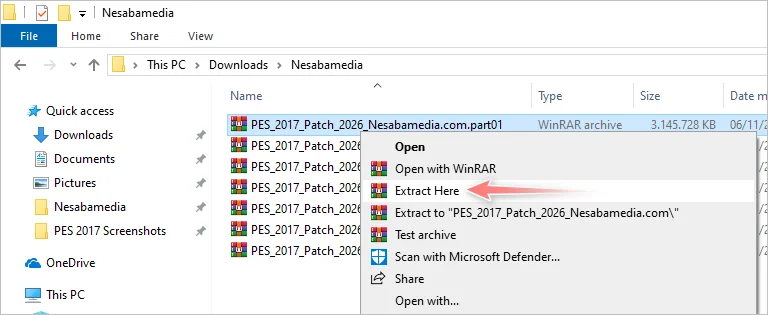
Extract the patch by collecting all the RAR archive files in one folder, then right-click on one of the files, select Extract Here, type nesabamedia.com in the password field, then click OK.
2. Copy to Documents
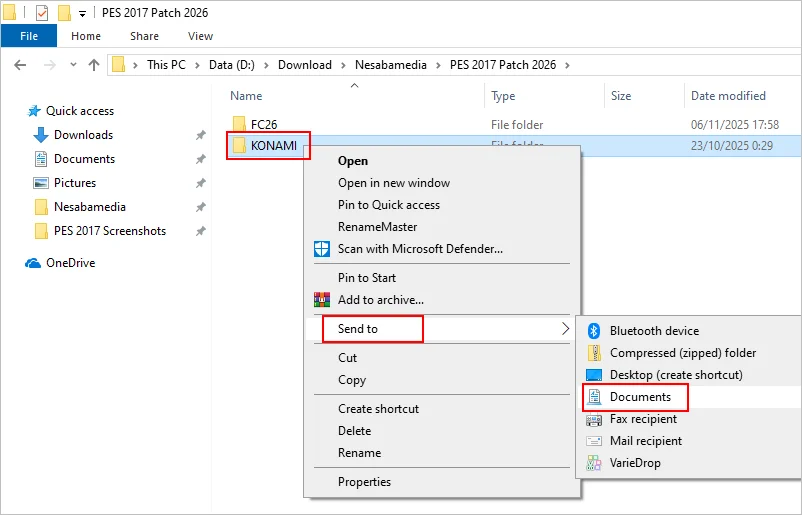
Open the newly extracted folder, then right-click on the KONAMI folder and select Send to > Documents. If a confirmation window appears to confirm the file overwriting, click Replace the file in the destination.
Notes
Winlator you can copy/paste /FC26/KONAMI to /Documents/KONAMI
3. copy all patch files
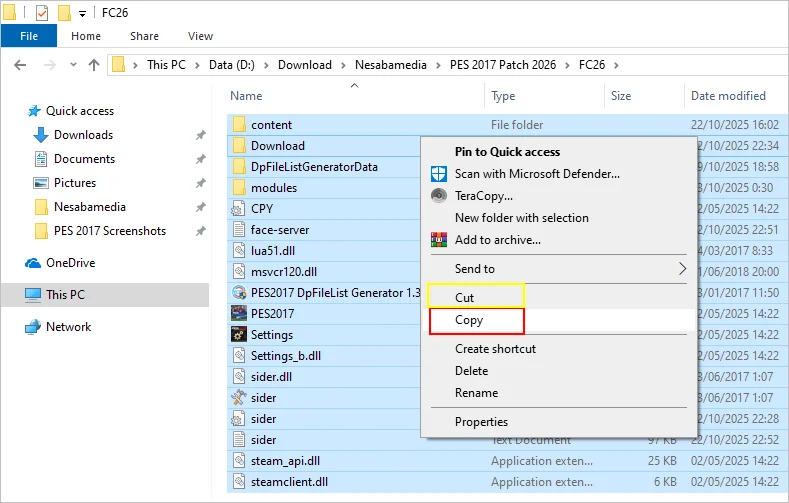
Buka folder FC26, lalu salin semua file didalamnya. Kalau sisa kapasitas harddisk kamu sudah mepet, pilih Cut saja di dalam menu klik-kanan.
4. Delete PES files
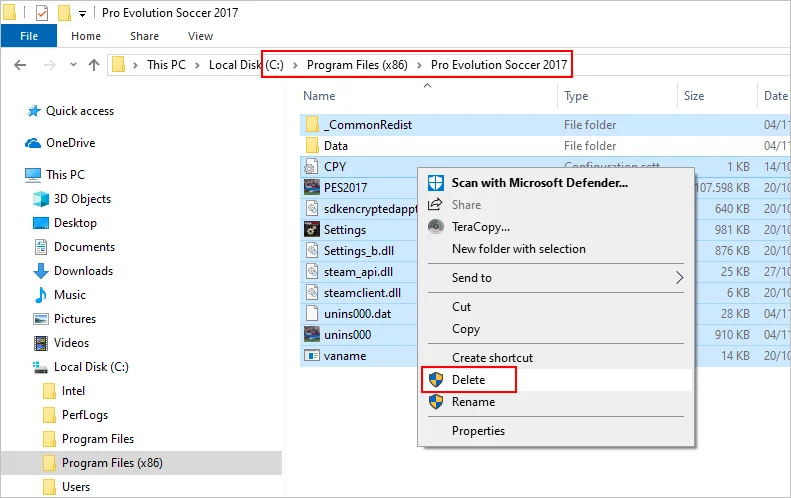
Open the PES 2017 installation folder and delete all files and folders inside EXCEPT the Data folder. If in doubt, move all files and folders EXCEPT the Data folder to another backup location.
5. paste all files
Paste all the files you copied in step number 3 above.
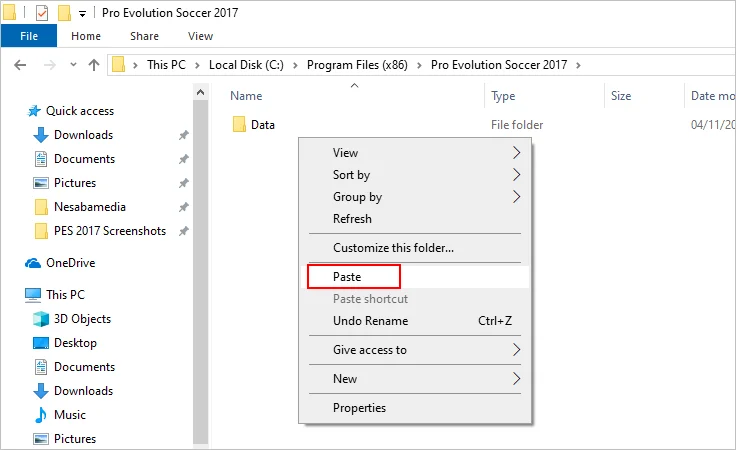
6. PES file replacement confirmation
Check Do this for all current items then click Continue.

7. Run dpfilelist generator
Double click on the PES2017 DpFileList Generator 1.3 file to run it.
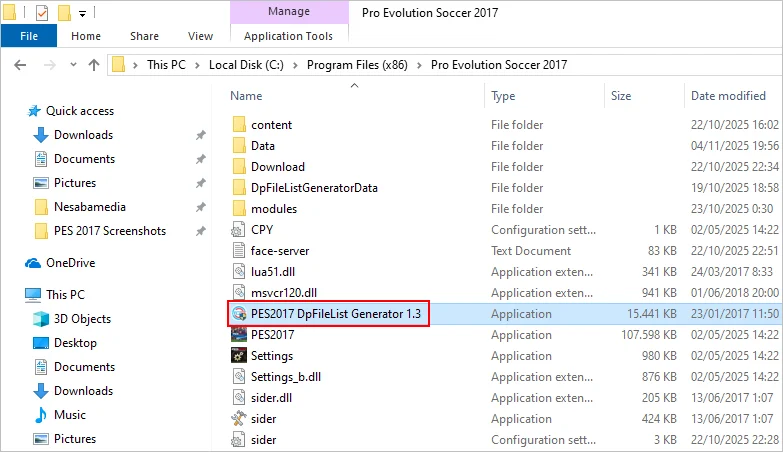
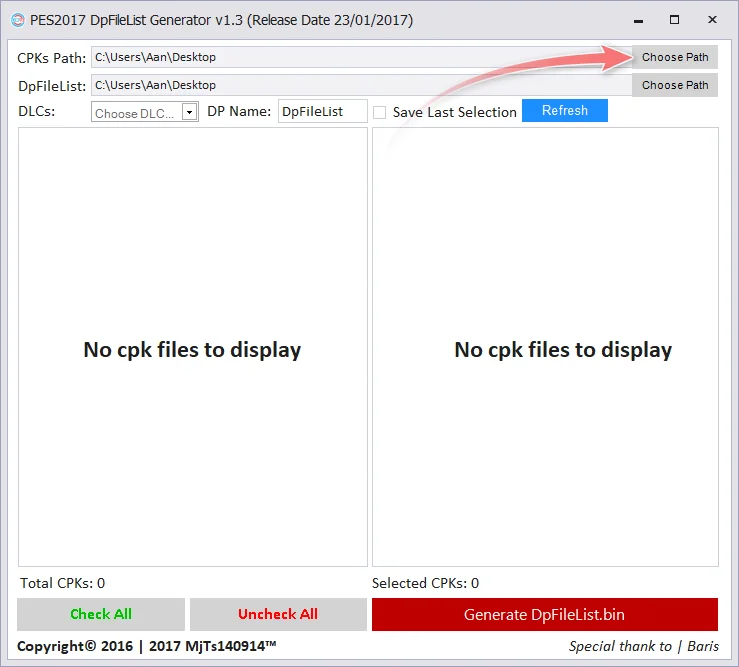
8. dpfilelist generator window
Click the Choose Path button.
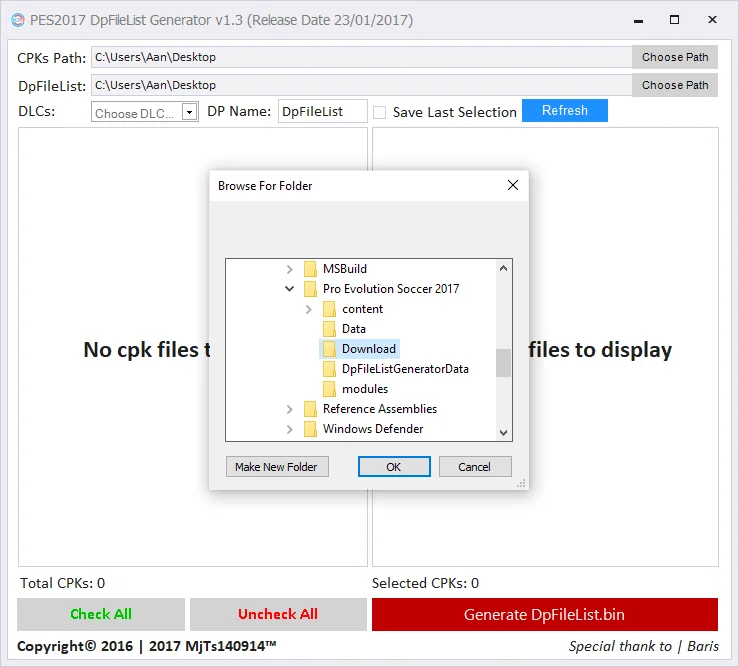
9. Navigate to the Download folder
Locate and open the PES 2017 installation folder, highlight/select the Download folder, and click the OK button. The installation folder is located at C:\Program Files (x86)\Pro Evolution Soccer 2017 or C:\Program Files\Pro Evolution Soccer 2017
10. List file cpk
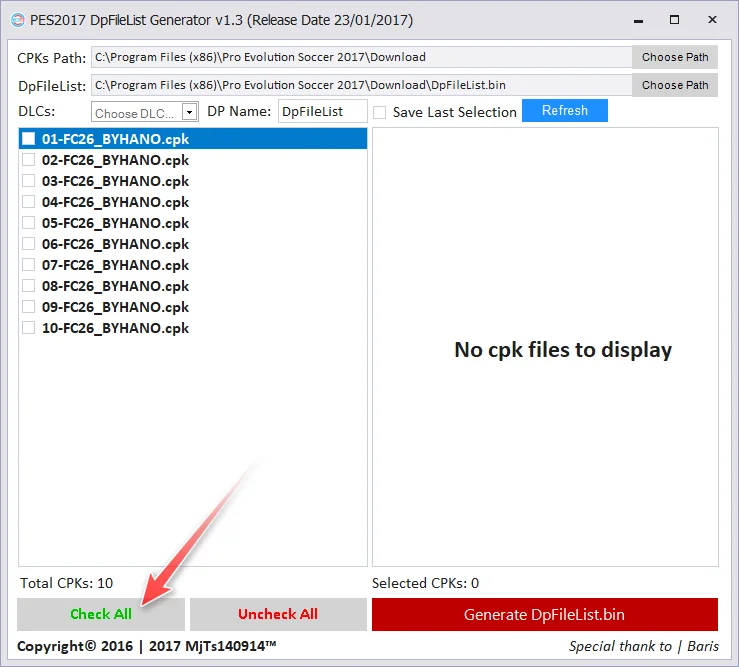
If the cpk list appears in the left panel, click the Check All button.
11. Select no DLC
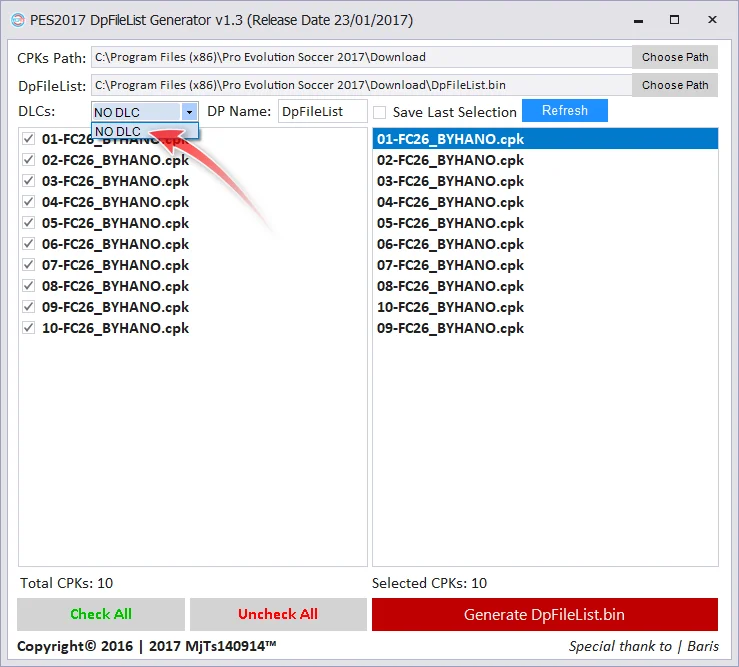
Once the cpk list appears in the right panel, click the DLCs menu button and select NO DLC.
12. Make dpfilelist.bin
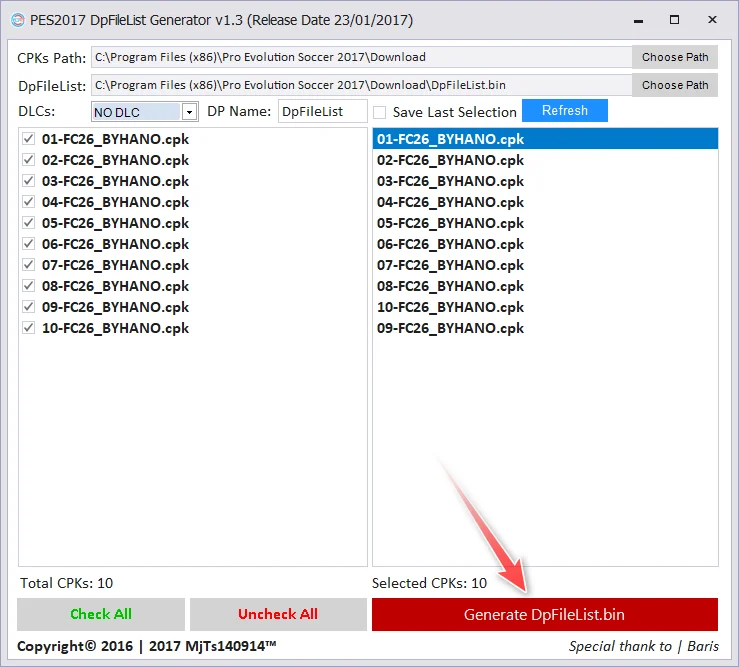
Click the Generate DpFileList.bin button, then click OK in the window that appears next, and finish by closing the DpFileList Generator window.
13. play PES 2017 with the 2026 season patch
To play the patched PES 2017, double-click on the PES2017 file.
Download Link
Pes 2017 Original
notes : download non preinstalled
PATCH 2026 + OptionsFile + DpFileList (real size 41 GB)
Usually the file is in the form of zip, rar, 7z, iso so it is long, extract/mount it using ZArchiver or WinRAR or other extractor applications.
Game Details
- Publisher Konami
- Developer PES Productions
- Release Date 2016
- API DirectX 9.0c
- File Size 10 GB
- Genre/TagsSports Simulation